
Apple’s iOS 26.4 update introduces a robust suite of customization tools, offering users unprecedented control over their device’s appearance and functionality. With features ranging from dynamic visual effects to enhanced widget capabilities, this update enables you to craft a lock screen and home screen experience that aligns perfectly with your personal style and practical needs. Whether you prefer a minimalist aesthetic or a feature-packed interface, iOS 26.4 delivers the flexibility to make your device truly your own. The video below from iReviews gives us more details on how to customize your iPhone with the latest version of Apple’s iOS.
Enhanced Lock Screen Customization
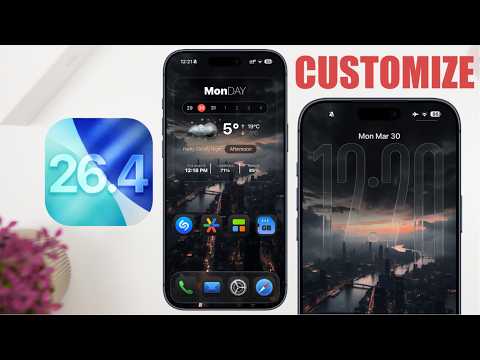
The lock screen in iOS 26.4 seamlessly blends aesthetics with functionality, providing tools to personalize both its appearance and usability. One of the most striking additions is the liquid glass effect, which integrates your wallpaper with clock elements to create a sleek, modern design. This effect offers a smooth visual flow, making your lock screen feel more dynamic and engaging.
For users seeking a cleaner interface, iOS 26.4 allows you to remove unnecessary lock screen buttons, resulting in a minimalist design that prioritizes simplicity. Widgets also play a central role in enhancing functionality. You can now display real-time information directly on your lock screen, such as:
- Available storage capacity
- Upcoming calendar events
To ensure these widgets remain legible, you can enable borders through the accessibility settings, improving visibility without disrupting the overall design. This combination of form and function makes the lock screen both visually appealing and highly practical.
Streamlined Home Screen Customization
Customizing your home screen in iOS 26.4 is more intuitive and versatile than ever before. A key feature is the ability to align your lock screen and home screen wallpapers, creating a cohesive visual theme across your device. Additionally, the introduction of transparent widgets, which can be designed using third-party apps, allows you to maintain a clean and uncluttered layout while still displaying essential information.
For those who prefer a minimalist approach, iOS 26.4 offers options to adjust icon sizes and remove app labels, simplifying navigation and reducing visual clutter. Allowing dark mode and fine-tuning reduced brightness settings further enhances the aesthetic appeal of your home screen while minimizing eye strain during extended use.
These customization options not only improve the visual harmony of your device but also make it easier to navigate and interact with your apps.
Optimizing Widget Placement
Widgets are a cornerstone of iOS 26.4’s customization features, offering a balance of functionality and design flexibility. To create transparent widgets, you can take a screenshot of your home screen and use third-party apps to match the widget background with your wallpaper. This technique ensures that widgets blend seamlessly into your home screen design, maintaining a polished and cohesive look.
Strategic widget placement is essential for maximizing usability without overwhelming your interface. Consider adding widgets that provide quick access to key features, such as:
- Ambient sound controls for managing audio settings
- Battery status monitoring to keep track of your device’s power levels
- Calendar management for staying organized and on schedule
By carefully selecting and positioning widgets, you can create a home screen that is both functional and visually appealing, tailored to your daily needs.
Advanced Features for Personalization
iOS 26.4 introduces several advanced options to further refine your device’s appearance and usability. You can experiment with different visual styles, toggling between liquid glass effects, tinted modes, and clear modes to find the one that best suits your preferences. These effects add a layer of personalization, allowing you to customize your device’s look in a way that feels uniquely yours.
To simplify navigation, consider reducing the number of home screen pages and relying on the app library for app organization. This approach not only declutters your interface but also makes it easier to locate and access your apps quickly. By streamlining your home screen layout, you can create a more efficient and user-friendly experience.
For users who value both form and function, iOS 26.4’s advanced features provide the tools to strike the perfect balance between aesthetic appeal and practical usability.
Become an expert in iOS 26.4 with the help of our in-depth articles and helpful guides.
Source & Image Credit: iReviews
Filed Under: Apple, Apple iPhone, Guides
Disclosure: Some of our articles include affiliate links. If you buy something through one of these links, Geeky Gadgets may earn an affiliate commission. Learn about our Disclosure Policy.
iOS 26.4 Lock Screen Tricks Apple Didn’t Tell You


